How to Find Internal Link Opportunities in Ahrefs

Another very under-rated SEO tool is that of internal linking. Internal linking is something that you have complete control over unlike backlinking which involves making other sites link to your website.
In this tutorial, we will cover everything you need to know about finding internal linking opportunities using Ahrefs.
Why Internal Links Matter for SEO
However, before we get to the ‘how’ part, let us first take a look at the ‘why’ aspect of this whole thing:
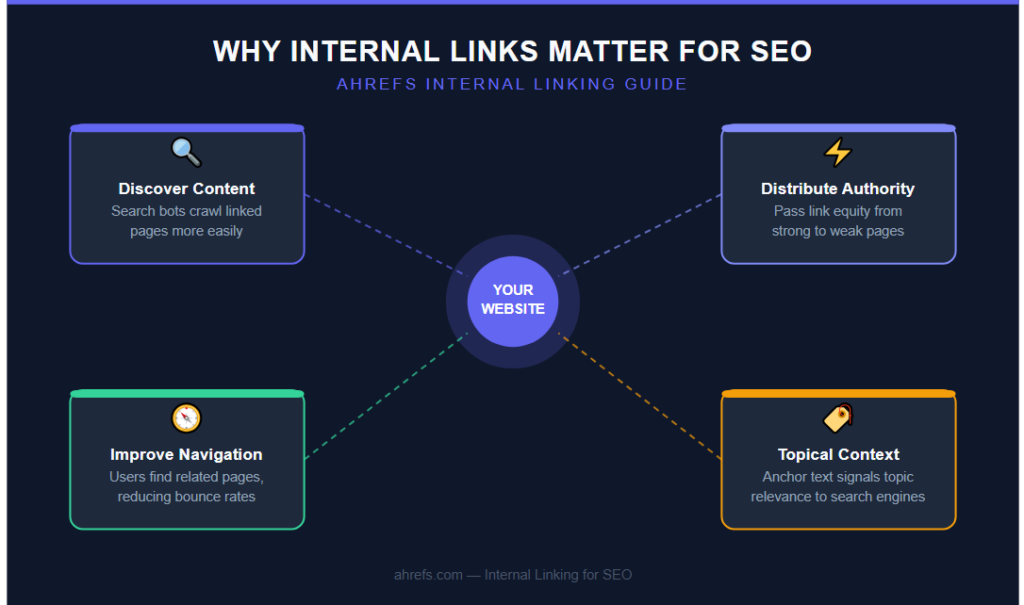
Internal Links Help Search Engines Discover Content
Pages that have fewer or zero internal links to them are difficult to crawl by search engine bots.
Internal Links Distribute Authority Across Your Site
Internal links provide link equity. Link equity can be passed from an authoritative page to a relatively new or less authoritative page in order for the latter to rank better by itself.
Internal Links Improve User Navigation
External to SEO, internal links enable users to find related pages, thereby increasing the time on the website and minimizing bounce rates.
Internal Links Provide Topical Context
Search engines also analyze the link text within the anchor tags along with other relevant information to know more about the linked page.
Finding Internal Link Opportunities Using Site Audit
The Internal Link Opportunities section is included in Ahrefs Site Audit. This tool is made for finding those areas on your site where you could benefit from creating an internal link, but haven’t done so yet.
How It Works
Site Audit scans your website for pages that have certain keyword mentions in their content and do not link to the appropriate page on your site at the moment.
How to Use It
- Perform a Site Audit crawl for your website (you can use the available crawl data if you have already performed an audit)
- Access the report on “Internal Link Opportunities” in Site Audit
- Look through the suggested opportunities – here you will see the source URL, target URL, and the exact phrase triggering this suggestion
- Create an internal link from the source URL to the target URL using the suggested (or changed) anchor text
What makes this report particularly impressive is that it identifies opportunities from content that you have already created rather than going through each page yourself and finding out any internal linking opportunities that you may have missed.
Finding Internal Link Opportunities Using Site Explorer
In addition to using the built-in Site Audit tool, the Site Explorer could also assist you in identifying some internal linking opportunities manually in a more efficient way.
Identify Your Highest-Authority Pages
Using Site Explorer, you should do an audit of your own site and select Best by Links report in Pages. You will see which pages of your website have the most links.
Such authoritative pages are ideal choices for adding internal links from to:
- Younger pages that need more authority
- Conversion pages (product pages, services pages, lead generation pages)
- Pages that are just missing out on ranking in the top 10
Identify Pages Ranking Just Outside Page 1
The Organic Keywords report in Site Explorer can be used to identify keywords where your page is ranked 11-20.
Page 2 results usually require just one extra boost in terms of authority, possibly through some internal linking strategies.
Match up the poor-performing pages with the best performing internal linking pages to see how you can improve them.
Finding Internal Link Opportunities Using Content Explorer
Content Explorer can enable you to uncover the content gaps that might require internal links to be established.
How to Use It
You could search for your core topics/themes using Content Explorer, and narrow it down to your own website.
It will pull up all the content you have generated on similar themes, and from there, you would know what kind of content could have logically been linked but hasn’t been at all.
This is particularly helpful in cases when you own a big site, and tend to forget about all the content that you have created till date.
A Practical Workflow for Internal Link Building
This is a structured method of using these tools:
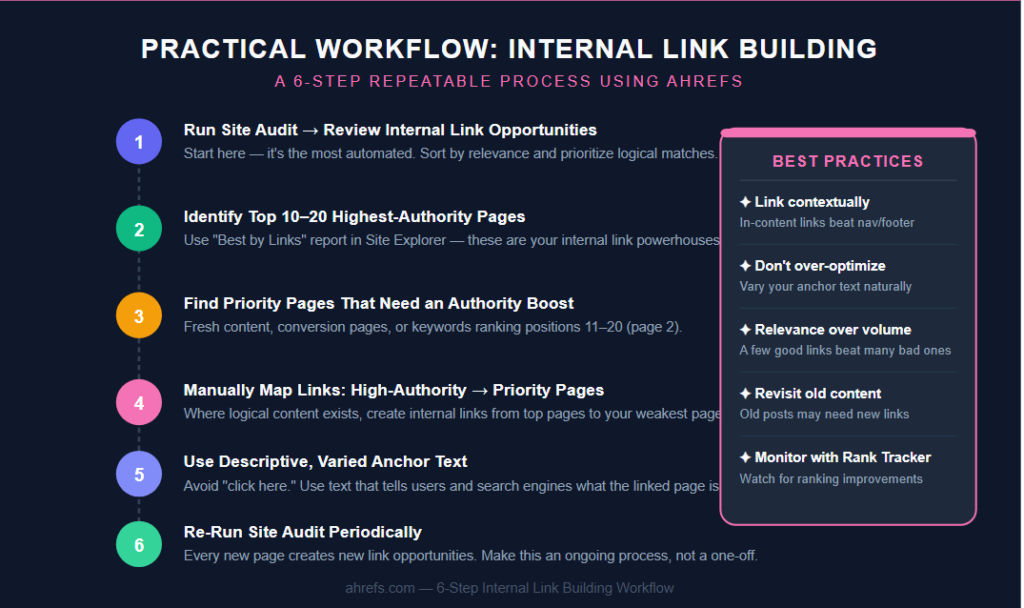
Step 1: Run Site Audit and Review Internal Link Opportunities
This is where you begin since it is the most automated one. Go through all the suggestions and prioritize those which are logically relevant to you.
Step 2: Identify Your Top 10–20 Highest-Authority Pages
You can use the Best by Links report in Site Explorer for your internal linking powerhouses.
Step 3: Identify Your Priority Pages That Need an Authority Boost
This consists of:
- Fresh content
- Key conversion pages
- Ranking just below page 1 (ranks 11-20) in the list of Organic Keywords
Step 4: Manually Map Links from High-Authority Pages to Priority Pages
Wherever you see a logical content link, create internal links from your top-performing pages to your weakest performing pages.
Step 5: Use Descriptive, Varied Anchor Text
Do not use generic anchor text such as “click here.” Use anchor text that describes what the destination page is all about, so that both the user and search engine know what the link is about.
Step 6: Re-Run Site Audit Periodically
As you post new content, run an updated Internal Link Opportunities report through the site audit feature.
Best Practices for Internal Linking
Some things to remember when implementing these opportunities:
Link Naturally Within Content, Not Just in Navigation or Footers
Contextual links within the content have greater relevance signals compared to links found in general site navigation or footer areas.
Don’t Over-Optimize Anchor Text
Although it is good to use descriptive anchor texts, do not keyword-stuff each one of your internal links using your exact target keywords. Instead, make use of varied anchor texts just like you would with your external linking efforts.
Prioritize Relevance Over Volume
A few strategically placed and relevant internal links will outweigh numerous irrelevant links spread throughout different web pages.
Don’t Neglect Older Content
New internal links can be found in old posts or web pages which have not been reviewed since the publication of relevant pages.
Monitor the Impact
If major changes in internal links have been made, check the ranking of affected pages using the Rank Tracker program to see if there is an improvement in the coming weeks.
Final Thoughts
One of the most cost-effective and high-value additions to SEO is that of internal linking, and there are several different methods Ahrefs offers for pinpointing the specific areas of need, ranging from the automatic Internal Link Opportunities report generated through Site Audit to more targeted analyses through Site Explorer and Content Explorer.
Make sure that doing internal link analysis becomes an ongoing process rather than a one-off SEO project. Each time new content is added to your website, new opportunities for linking it to other pages will present themselves.