AI Workflow Automation: What It Actually Covers and Why It’s Easy to Get Wrong

Introduction
Workflow process automation through artificial intelligence refers to the use of artificial intelligence to automate multi-stage business processes from start to finish and not just a particular single step in the workflow process.
It may sound fairly straightforward; nonetheless, the number of interconnected steps in the actual workflow process is something that businesses have a tendency to overlook in their plans for implementation.
Why AI Workflow Automation Is More Complex Than It Appears
Workflow is not a single and consistent task, but rather a combination of the following:
- Events that trigger the workflow process
- Multiple steps executed sequentially or concurrently by different systems
- Points of decision-making or branching on data
There are many companies which automate one step at a time and refer to this as “workflow automation,” but due to the limited scope of this process, everything else remains as manual as ever.
When automating a cross-departmental process within an organization, every transition must be mapped out separately since workflow automation is only as effective as its least automated step.
Major Areas of AI Workflow Automation
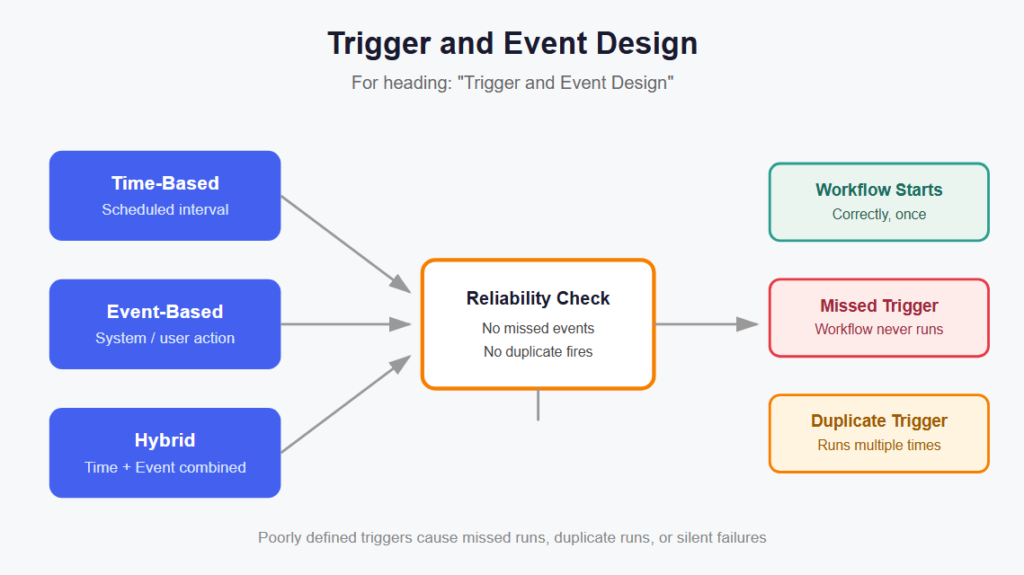
Trigger and Event Design
Rules Governing:
- What initiates the automated process
- Type of triggers whether time-based, event-based, or both
- The reliability of the trigger firing process without any missed events
One of the most common problems in terms of costs is poorly defined triggers since it can lead to:
- Workflow not being started at all
- Multiple workflow executions due to unnecessary triggers
- Necessity to manually handle the missed cases
Multi-Step Process Orchestration
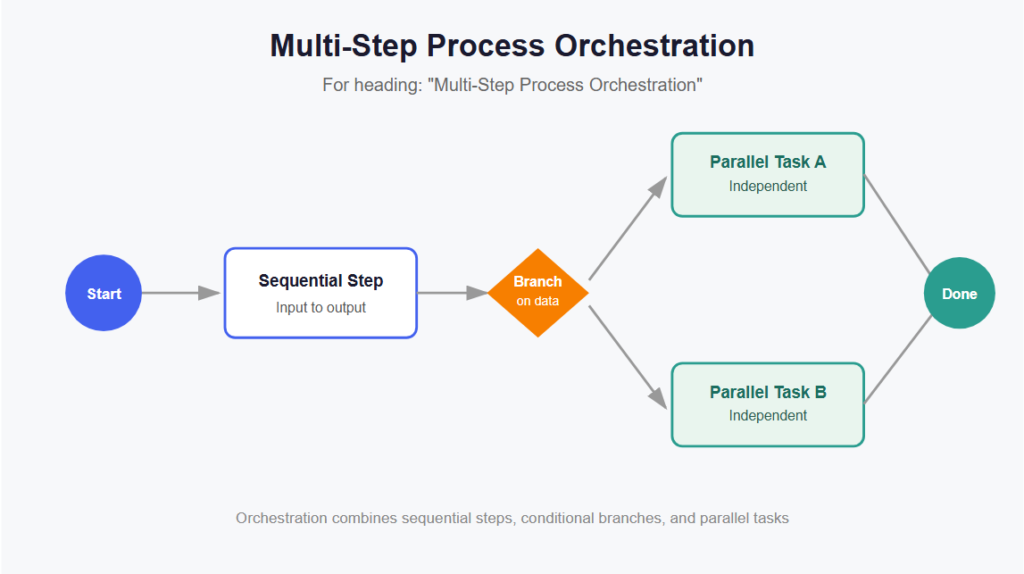
AI Workflow Automation Platforms usually come with a visual builder where every process has to follow a sequential flow that includes input and output for every step.
Orchestration Often Includes:
- Sequential processes followed in order
- Parallel branches for independent tasks
- Routing of processes conditionally based on data or AI decision-making
AI-Driven Decision Points
Handling is not only made up of rigid procedures but also the growing trend of using AI technology in the process to make decisions related to classification, prioritization, or summarization of information.
Those Decision Points Usually Vary in Many Respects Including:
- How confident the AI system is before making an autonomous decision
- Whether low-confidence decisions go through humans
- How decisions are recorded for analysis
System Integration Across Tools
Workflow automation via AI generally entails:
- Integration between CRMs, emails, and databases.
- API integration for customized systems.
- Consistency in data format in all connected applications.
The stability of a workflow depends on how robust the mentioned integrations are.
Monitoring and Error Handling
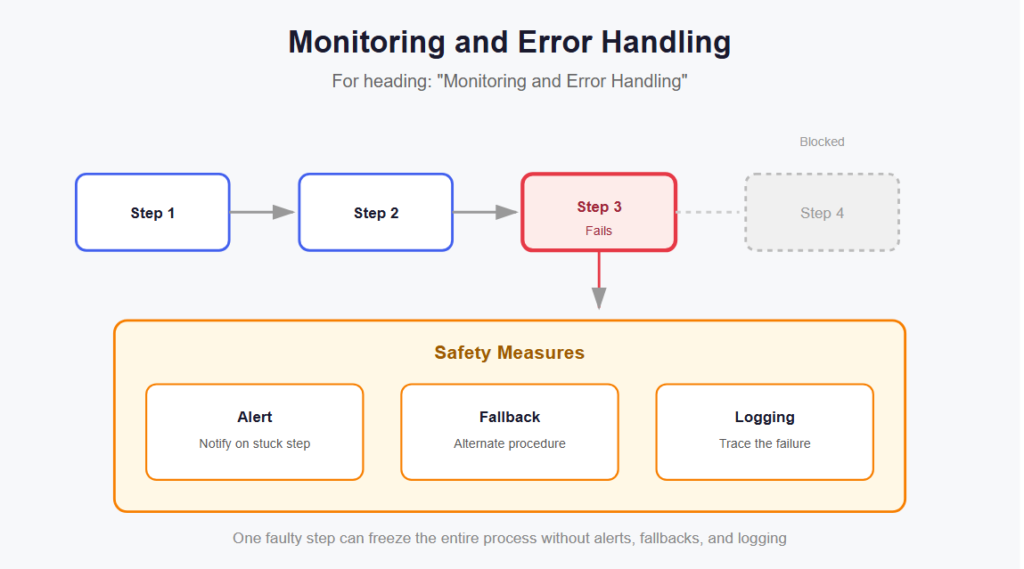
Some of the systems that offer workflow automation for AI need the team to have the following safety measures in place:
- Notifications in case something gets stuck in one of the steps
- Alternative procedures when there is an issue in the integration
- Good logging so that it would be easy to find problems
These safety measures are required because one faulty step in a multistep procedure will cause the whole process to freeze.
Why AI Workflow Automation Breaks Down Even at Well-Planned Companies
Genuine failure to automate a process from end-to-end is not usually due to the lack of appropriate technology.
Indeed, it could be caused by the following:
- The workflow is not fully automated but has some manual elements in other parts of the process.
- API changes make integration fail quietly between two systems.
- There is insufficient monitoring of the workflow.
How Organizations Build Reliable AI Workflow Automation
Mapping the Full Process First
Large companies will often document each step of a process prior to any form of automation, particularly when the process crosses different departments within the organization.
Automation Features Supporting End-to-End Reliability
A number of AI workflow automation tools include capabilities that allow organizations to:
- Create decision points to match real-life decision making
- Define escalation criteria for AI decisions lacking confidence
- Monitor workflow performance through alerting on failures
Regular Workflow Audits
Organizations perform audits to check:
- The existence of manual tasks in an automated process
- Stability in integration between interlinked systems
- Accuracy in decision-making points in artificial intelligence
Periodic audits help organizations ensure that their workflows remain reliable.
Common AI Workflow Automation Mistakes
Automating Isolated Steps Instead of Full Processes
Referred to a solitary automated process as “workflow automation” without automating other processes around it.
Ignoring Integration Fragility
Thinking that communication between systems will continue to function forever without checking for failure.
Skipping Escalation Paths
Lacking an appropriate flow for passing low-confidence AI decisions to the human reviewer.
Poor Documentation of Workflow Logic
Lack of sufficient documentation about:
- Reasons why the particular branching logic had been chosen
- Who will maintain each component of the process flow
- Troubleshooting when something goes wrong at a step in the process
Can result in confusion and delay in fixing whatever is wrong in due time.
Bottom Line
Workflows automated using AI have many aspects including triggering processes, orchestration involving multiple steps, decision-making by AI, integration into the system, and monitoring.
Given that it is easy to maintain a partly manual process even after calling it “automated,” it is better for the organization to first map the whole workflow process before automating it.