Construction Project Management Software That Integrates With QuickBooks

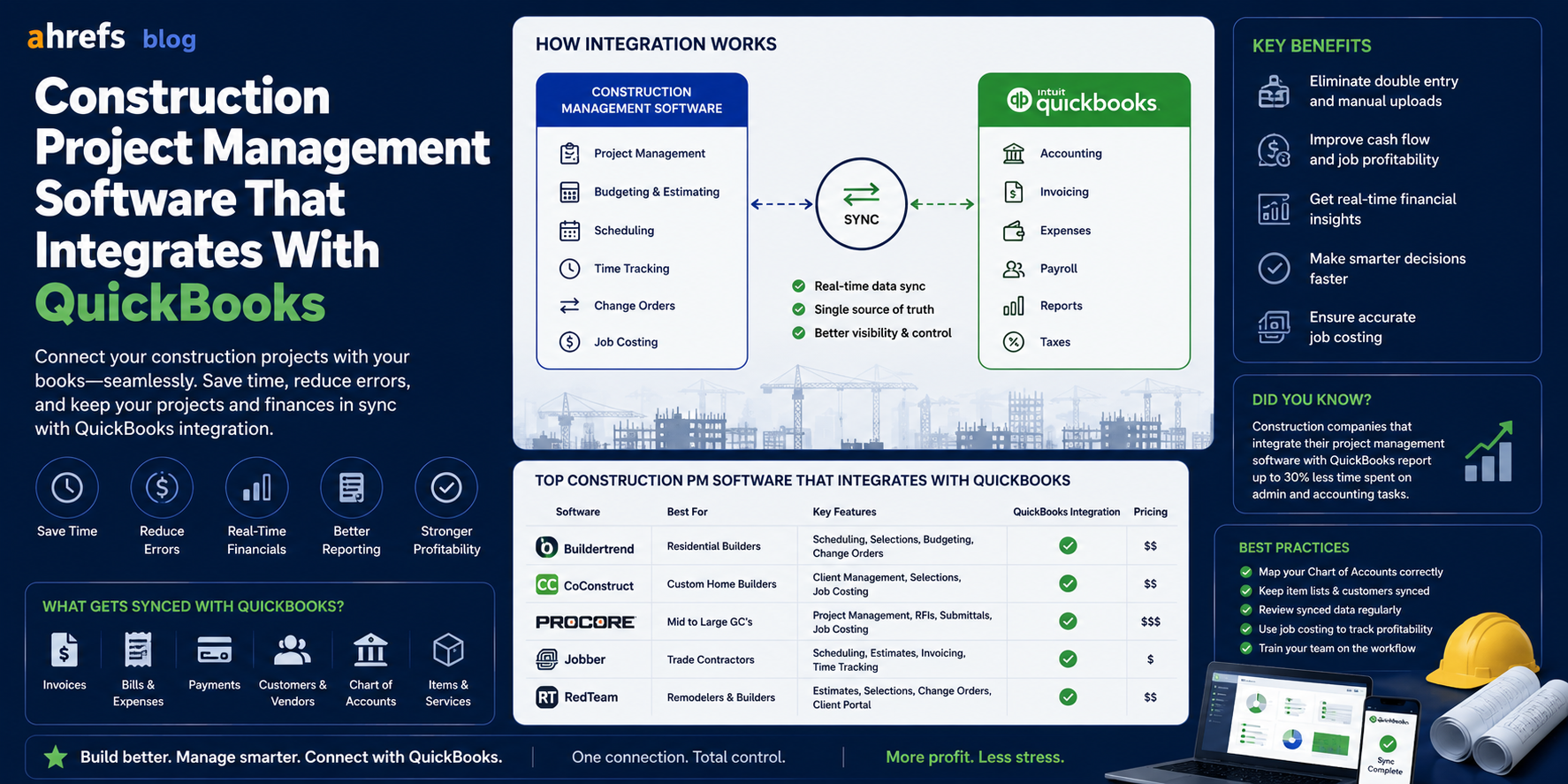
Almost all contractors keep their accounting records on QuickBooks. However, QuickBooks wasn’t designed for cost accounting, subcontractor management, and project tracking. The only way out is using an appropriate construction PM software that connects to QuickBooks, thus ensuring that your project and field information stays where it belongs and accounting information remains in QuickBooks where it’s known to your accountant. Here’s how this connection works and which platforms provide the best solutions.
Table of Contents
- The Importance of QuickBooks Integration for Construction
- How an Integration Works
- Top Project Management Software for Construction That Supports QuickBooks
- The Difference Between QuickBooks Online and QuickBooks Desktop Integration
- Key Factors Before Taking the Leap
- Final Thoughts
Why the QuickBooks Integration Matters for Construction
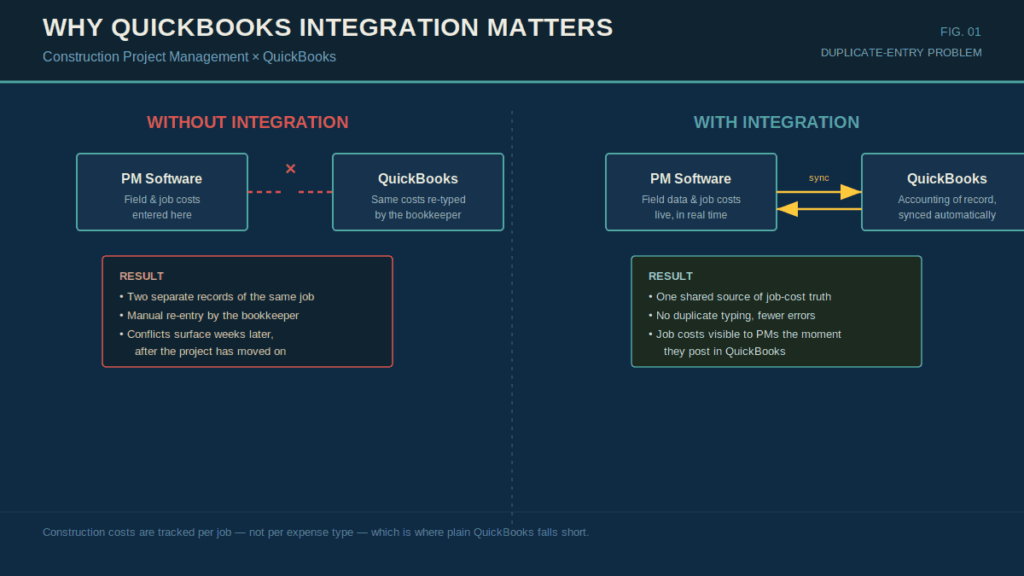
There is a unique accounting issue faced by construction firms since their expenses incur on the level of each individual project (labor, material, sub-contractor expenses, machinery), which must be recorded for each job, not for each type of expense.
QuickBooks takes care of the accounting issues, accounts payable, payroll, taxes, but does not offer solid solutions for job costing and field management.
Without proper integration, managers enter costs into the field management solution, whereas accountants duplicate that information in QuickBooks, resulting in two records, potential conflicts and mistakes, which will be found out only when it is already too late, several weeks after the project.Integration provides for one-way or two-way synchronization of the data.
What a Good Integration Actually Does
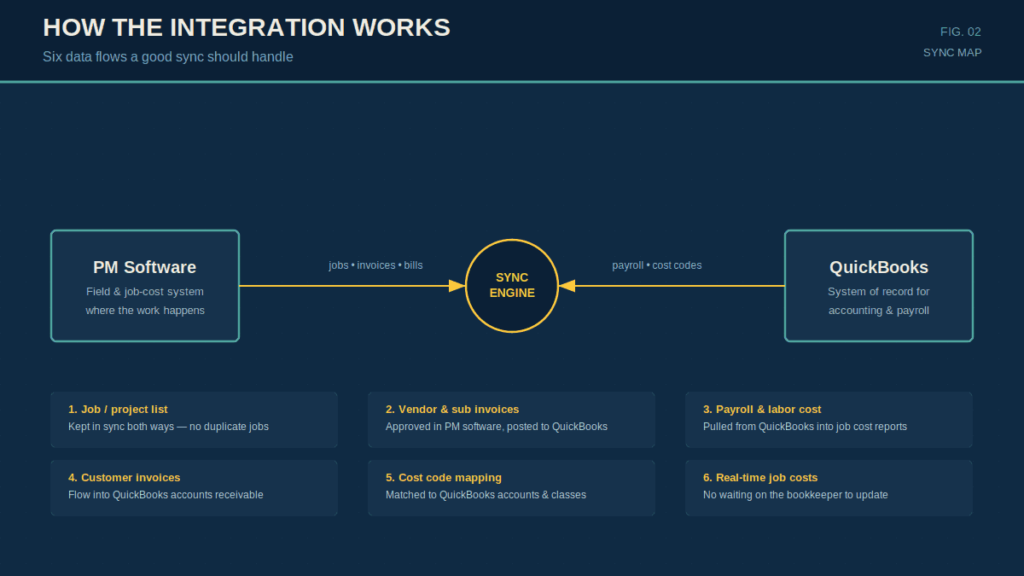
The features that an efficient QuickBooks integration for Construction Project Management should include are:
- Syncing the list of jobs/projects in both systems so that there are no duplicates.
- Importing vendor bills/subcontractor invoices that are already approved in the Project Management software into QuickBooks.
- Importing payroll/labor costs from QuickBooks into the job cost report in the Project Management software.
- Syncing customer invoices from the Project Management software into QuickBooks’ accounts receivable.
- Mapping cost codes from the Project Management software to QuickBooks’ accounts and classes.
- Having real-time job cost information available in the Project Management software without any need for updates from the bookkeeper.
Best Construction PM Software That Integrates With QuickBooks
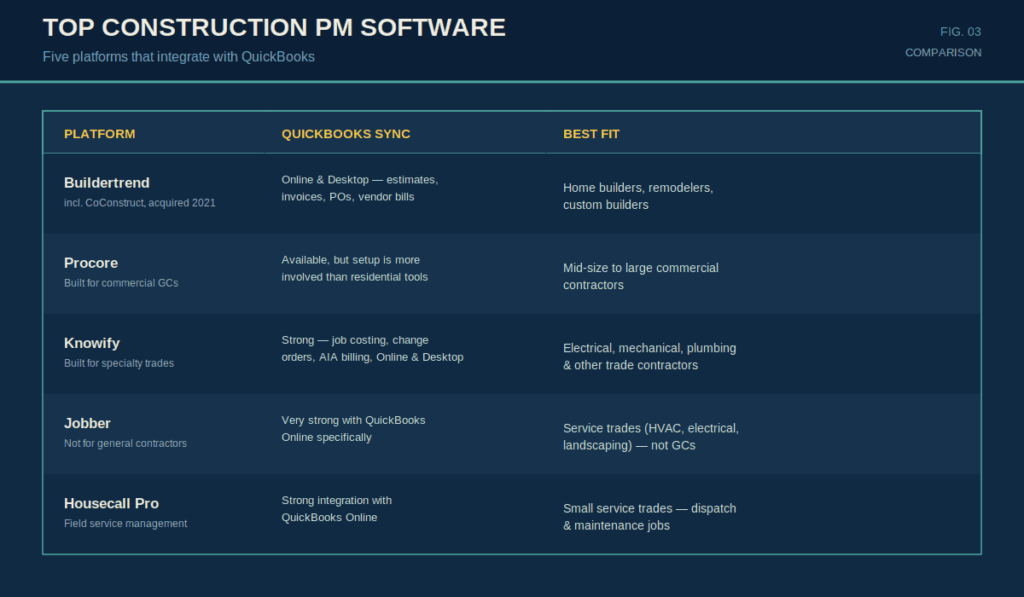
Buildertrend
One of the most commonly used construction project management software applications for home builders and remodelers. Features seamless integration of QuickBooks (both Online and Desktop), estimates, invoices, purchase orders, and vendors’ invoices. Also good in terms of customer communication and scheduling functionality.
Best fit: Home builders, remodelers, custom builders.
CoConstruct (now Buildertrend)
CoConstruct was acquired by Buildertrend in 2021. The software combines strong budget management capabilities and client portal of CoConstruct with QuickBooks integration feature from Buildertrend.
Procore
Dominant application for commercial general contractors. Features QuickBooks integration functionality, although not as easy to set up as for residential-oriented software. More appropriate for companies with an accounting department than for small businesses.
Best fit: Mid-size to large commercial contractors.
Jobber
Not for general contractor businesses (like HVAC, electrical, plumbing, landscaping), but for small specialty sub-contractors instead. The system integrates very nicely with QuickBooks Online and everything works flawlessly.
Best fit: Service trades businesses, not construction GCs.
Knowify
Custom-designed for specialty sub-contractors and has great QuickBooks integration features. Manages job costing, change orders, AIA billing, and sub-contractor management with QuickBooks integration on both Online and Desktop versions.
Best fit: Electrical, mechanical, plumbing, and other specialty trade contractors.
Housecall Pro
Field Service Management software that is targeted at trades businesses. Great integration with QuickBooks Online. Better suited for service dispatching and maintenance jobs than large-scale project management.
Best fit: Small service trades businesses.
QuickBooks Online vs. QuickBooks Desktop: Integration Differences
Generally, the majority of modern project management tools have better compatibility with QuickBooks Online compared to QuickBooks Desktop. Reasons why:
- QuickBooks Online works through an open API that enables third-party software to access its functions in a native way.
- QuickBooks Desktop relies on such solutions as IIF export/import or a separate sync application (e.g., QuickBooks Sync Manager) or a third-party connector (Connex, Webgility).
If you are using QuickBooks Desktop and planning to get a project management platform, make sure to check how exactly the integration will work.
What to Check Before You Commit
In any event, before choosing which construction PM software with QuickBooks integration is right for you, confirm the following:
Sync Direction
Is the information transfer uni-directional (PM software > QuickBooks) or bi-directional? What fields are synchronized in which direction?
Field Mapping
Are you able to align the cost codes and phases in your PM software with your QuickBooks chart of accounts? Here lies the problem with most construction software that purports to integrate with QuickBooks.
QuickBooks Version
Online or desktop? And what version of the desktop program (Pro, Premier, or Enterprise)?
Sync Frequency
Is it in real-time, daily, or manual?
Historical Data
Do you have the ability to transfer existing QuickBooks data (customers, vendors, chart of accounts) into the new project management software without having to enter that information all over again?
Final Thoughts
The integration of the software with QuickBooks is what usually seals the deal for many construction firms when deciding which project management software is best to use, since job cost accuracy requires that data is shared between the field and the accounting without double entries. Buildertrend is the best for home builders while Knowify wins out for specialty trade contractors. However, Procore works best for commercial general contractors that have the money to put forth more effort into setting up the system.