Project Management Board Ideas: How to Design One That Teams Actually Use

It’s better to have no project board than a project board that is never updated, you give people a false sense of security. If you are using a physical whiteboard in your office or a digital Kanban in ClickUp, the design of your project board will decide if you’ll be able to turn it into the central source of information or just another task manager. Here’s a list of the best project management boards ideas for different use cases and how to make them work.
Table of Contents
- The Main Goal of a Project Management Board
- Kanban Board Ideas
- Sprint / Agile Board Ideas
- Project Status Board Ideas
- Physical Whiteboard Board Ideas
- How a Board Works (And Doesn’t Work)
- Conclusion
The Core Purpose of a Project Management Board
The role of a project board is to communicate the status of the project without having to ask anybody.
The ideal project boards have three clear communication points:
- The work being done currently
- The obstacles in the way
- The finished work
All other information just adds unnecessary noise.
Kanban Board Ideas
Kanban Board is the most flexible form of the board for any ongoing project activity.
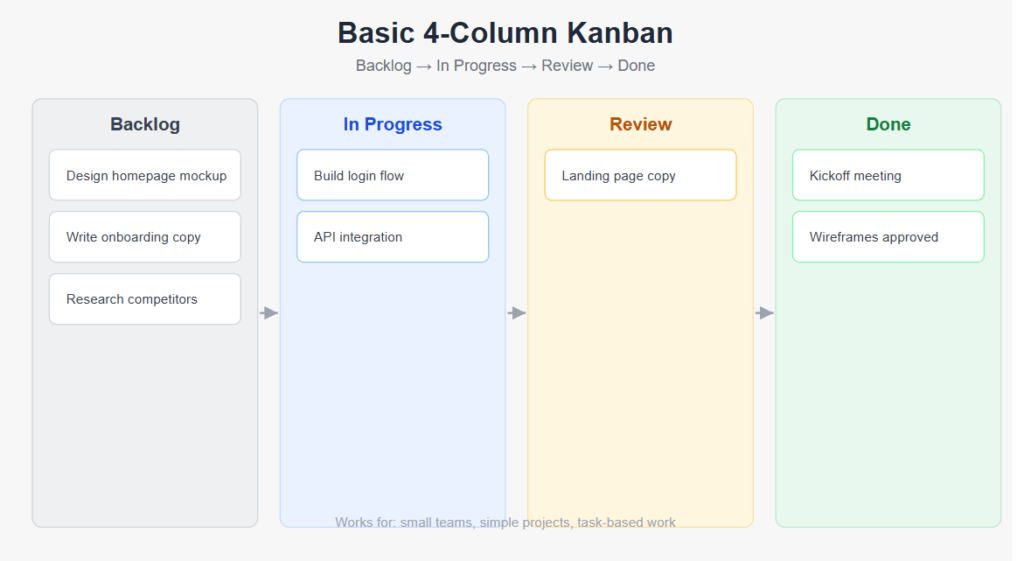
Basic 4-Column Kanban
Backlog → In Progress → Review → Done
Works For
- Small teams
- Simple projects
- Task-based project activity
Easy to adopt, easy to maintain.
6-Column Agency Workflow Board
Briefing → Design → Client Review → Revisions → Final Approval → Delivered
Works For
- Creative companies
- Teams of designers, where client approval is a separate step that requires visibility
Engineering / Dev Workflow Board
Backlog → In Sprint → In Development → In QA → Ready to Deploy → Deployed
Works For
- Software development teams requiring differentiation between development, testing, and releases
Support / Ops Triage Board
New Requests → Triaged → In Progress → Pending (Blocked) → Resolved
Works For
- IT support
- Operations teams
- Workflow for customer services where the amount of incoming requests needs to be managed before any work starts
Sprint / Agile Board Ideas
In case you work using sprints, you should have a board that reflects the sprint cycles and not just task statuses.
Sprint Board with Story Points
Assign tasks to the sprint column, which is estimated using story points.
- Separate Done (this sprint) from Backlog (next sprint) clearly.
- Add a Blocked or Impediments swimlane for high-visibility obstacle tracking.
Product Roadmap Board
Use swimlanes based on quarters or releases, where tasks or epics exist.
This provides an overview of all plans in the entire life cycle of the product development process, which is not shown by a sprint board.
Retrospective Board
Generate three columns:
- What Went Well
- What Didn’t Go Well
- Actions for Improvement
Utilized at the end of each sprint to get feedback from the team and improve the process. Usually done via a physical whiteboard or using tools like FunRetro and EasyRetro.
Project Status Board Ideas
In cases where project managers manage several projects at once, a portfolio status board is better than a project status board.
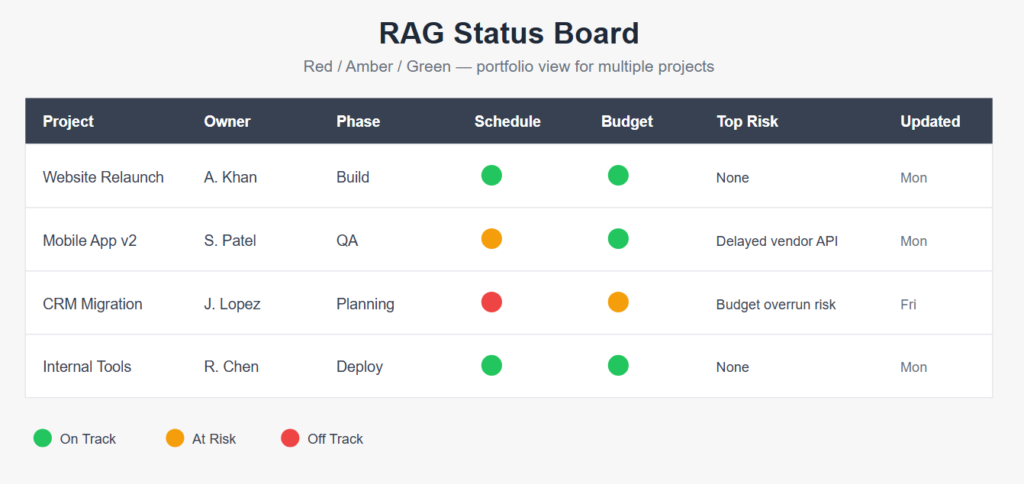
RAG Status Board (Red / Amber / Green)
Each project gets a row.
Suggested Columns
- Project name
- Owner
- Phase
- Schedule status (RAG)
- Budget status (RAG)
- Top risk
- Last update
This allows the top management to get the health of the portfolio at a glance.
Project Milestone Tracker Board
One line should be allocated for each project and columns for milestones.
Milestones need to be color-coded depending on whether or not they have been achieved.
The board will help in identifying where every project is on the timeline.
Weekly Priorities Board
The team-level board needs to be updated every Monday.
Suggested Columns
- Person
- This Week’s Priority 1
- This Week’s Priority 2
- This Week’s Priority 3
- Blockers
This will allow visibility of the plan each week without holding a status meeting.
Physical Whiteboard Board Ideas
Physical Kanban boards can still be effective, especially for groups working from one place or even as a supplement to daily stand-up meetings.
Sticky Note Kanban
Use a whiteboard with columns defined along with sticky notes in various colors for tasks performed by different people.
Shifting the sticky note to the column Done feels psychologically stronger than just changing the status, so the board remains more up-to-date in reality.
War Room Board
For high-profile projects, have dedicated columns or walls for:
- Timeline
- Risk Log
- Stakeholder Map
These are used in building, events management, and emergency response situations when several teams require constant visibility.
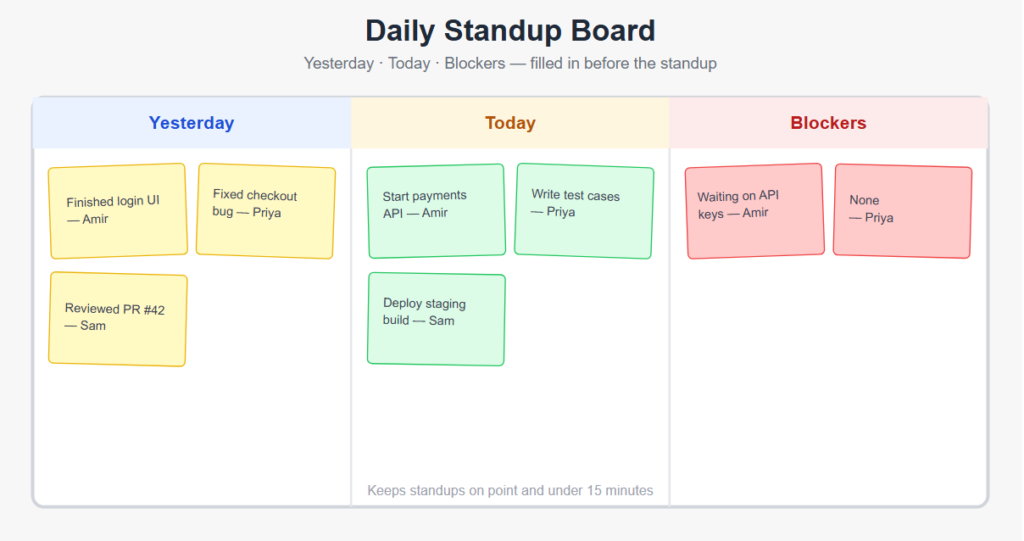
Daily Standup Board
Three columns should be created:
- Yesterday
- Today
- Blockers
Team members fill in their column before the standup.
This helps keep the meeting on point and under 15 minutes since all the answers are right there.
What Makes a Board Work (and What Kills It)
What Works
- Columns tailored to your process, not just a standard framework
- A Definition of Done for every step to avoid getting tasks stuck in limbo
- A person in charge of the cleanliness of your board, making updates a habit, not an action
- Maximizing WIP Limits for the in-progress columns to avoid overburdening them
What Kills It
- Too many columns and swimlanes that confuse people on where a particular task should be
- Tasks that hang around in In Progress for weeks because no one bothers closing them
- An immaculate-looking board at launch that is never updated after week three
- Statuses that describe how work should be moving, not how it really is
Final Thoughts
The best project management board will be the one that is the most simple but effective and will continue to be updated by the team. Keep the number of columns as low as possible and add them only if you face some concrete problems, make the update process a part of your routine, not the weekly task.