What Are Google Alerts? (And How to Use It for SEO and Marketing)

Most marketers are familiar with Google Search, but far fewer take advantage of Google Alerts, a free tool that continuously monitors the web for topics, keywords, and brand mentions that matter to you.
Google Alerts is one of the simplest yet most powerful tools available for SEO professionals, content marketers, PR teams, and business owners. Once configured, it automatically delivers relevant updates directly to your inbox, helping you stay informed about your brand, competitors, industry trends, and potential opportunities.
In this guide, you’ll learn what Google Alerts is, how it works, and how to use it strategically for SEO, marketing, public relations, and competitive research.
What Are Google Alerts?
Google Alerts is a free monitoring service provided by Google that notifies users whenever new content matching specific keywords appears in Google’s index.
Instead of manually searching for information every day, Google Alerts automatically scans newly indexed content and sends email notifications whenever your selected terms are mentioned online.
What Can You Monitor With Google Alerts?
Google Alerts can track:
- Brand names
- Company names
- Personal names
- Product names
- Industry keywords
- Competitor brands
- News topics
- Market trends
This allows businesses and marketers to stay informed without constantly monitoring search results manually.
How Does Google Alerts Work?
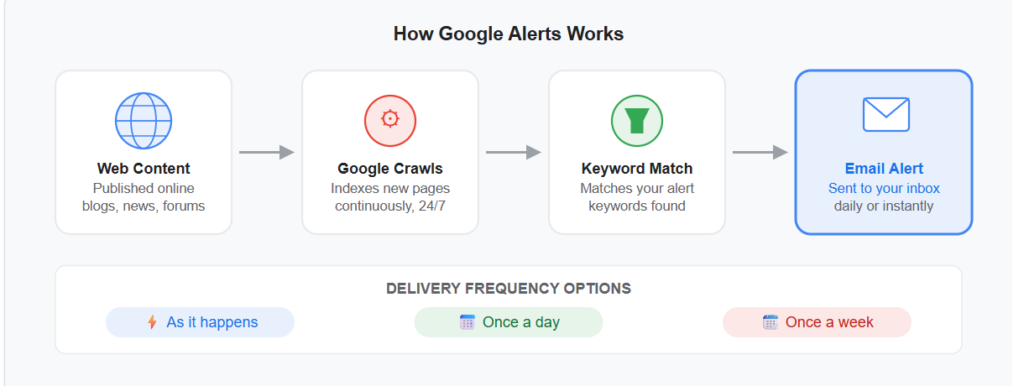
Google Alerts uses Google’s search infrastructure to identify newly published content across the web.
Whenever Google discovers and indexes content containing your chosen keywords, it generates an alert and sends a notification according to your selected preferences.
The Google Alerts Process
The process is straightforward:
- A website publishes new content.
- Google crawls and indexes the page.
- The content matches one of your alert keywords.
- Google generates an alert.
- You receive an email notification.
This automated workflow helps users stay informed about important online mentions and developments.
Types of Content Google Alerts Monitors
Google Alerts tracks a wide variety of content sources.
News Websites
Stay informed whenever journalists publish stories related to your brand, competitors, or industry.
Blogs
Monitor blog posts discussing relevant topics, products, or companies.
Forums and Discussion Sites
Discover conversations taking place across online communities and discussion platforms.
General Web Pages
Receive notifications whenever websites publish content containing your target keywords.
What Google Alerts Does Not Monitor
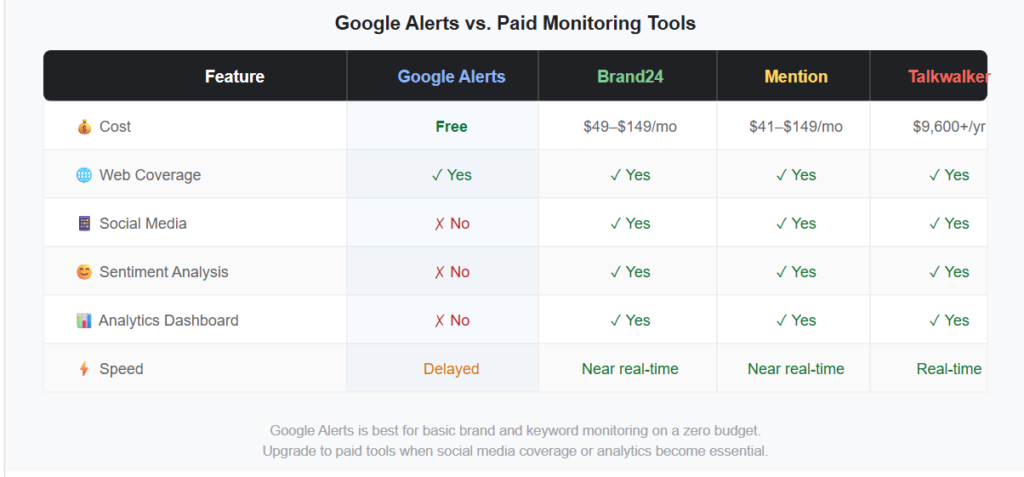
Google Alerts has limited visibility into social media platforms, including:
- X (Twitter)
- TikTok
For social media monitoring, specialized social listening tools are generally required.
Why Google Alerts Is Valuable for Marketers
Google Alerts provides continuous market intelligence with virtually no ongoing effort.
Below are some of its most useful applications.
Brand Monitoring
Monitoring your brand name helps you stay informed about:
- Customer reviews
- Press mentions
- Blog coverage
- Forum discussions
- Industry references
Benefits of Brand Monitoring
- Protect your online reputation
- Discover PR opportunities
- Respond quickly to negative mentions
- Build relationships with publishers
Competitor Intelligence
Google Alerts can provide valuable insights into your competitors’ activities.
Track competitor names to discover:
- New product launches
- Press coverage
- Partnerships
- Content campaigns
- Industry recognition
This information can help shape your own marketing and SEO strategy.
Finding Unlinked Brand Mentions
One of the most effective link-building techniques involves converting unlinked mentions into backlinks.
When another website mentions your brand without linking to your website, Google Alerts can help you identify the opportunity.
How It Works
- Receive an alert mentioning your brand.
- Check whether the mention includes a link.
- If not, contact the publisher.
- Politely request a link to your website.
Because the website already mentioned your brand, these outreach requests often achieve higher success rates than cold link-building campaigns.
Content Research and Trend Monitoring
Google Alerts can function as a content discovery engine.
By tracking industry topics and keywords, you can identify emerging trends before they become mainstream.
Benefits
- Generate new content ideas
- Discover trending topics
- Monitor industry developments
- Identify audience interests
Publishing content early on emerging trends can provide a significant SEO advantage.
Recruitment and Hiring Intelligence
Businesses can monitor hiring trends and recruitment activities within their industry.
For example, alerts such as:
- “[Competitor] hiring”
- “Marketing Manager job opening”
- “SEO Specialist recruitment”
can reveal where competitors are investing resources and expanding operations.
Personal Brand Management
Professionals, consultants, executives, and creators can use Google Alerts to monitor their online presence.
Tracking your name helps you discover:
- Media mentions
- Interviews
- Guest appearances
- Citations
- Industry discussions
This visibility allows you to manage and strengthen your personal brand.
How to Set Up Google Alerts
Creating a Google Alert only takes a few minutes.
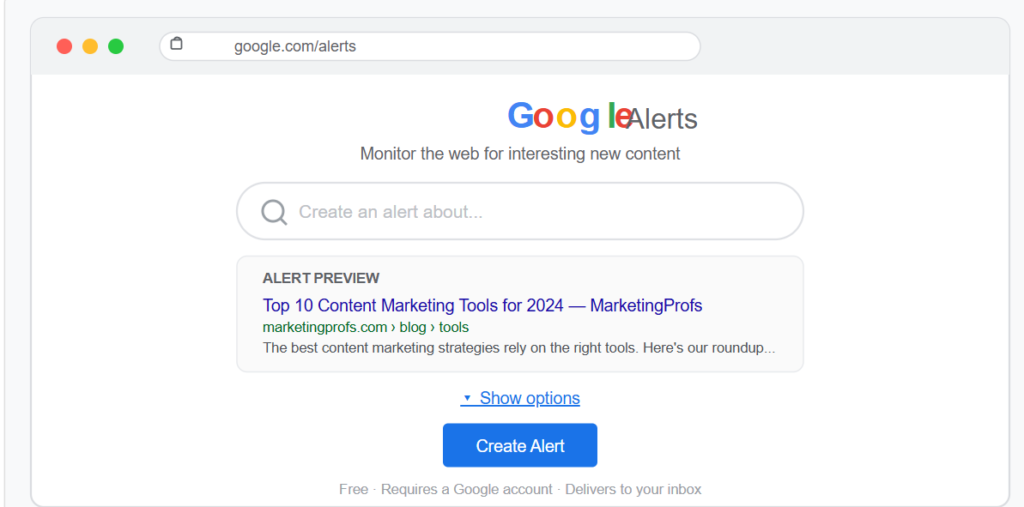
Step 1: Visit Google Alerts
Navigate to the Google Alerts website and sign in with your Google account.
Step 2: Enter Your Keyword
Type the keyword, phrase, or topic you want Google to monitor.
Examples include:
- Your company name
- Competitor names
- Product names
- Industry terms
As you type, Google displays recent matching results.
Step 3: Customize Alert Settings
Click “Show Options” to configure your preferences.
Alert Frequency
Choose how often notifications are delivered:
- As-it-happens
- Once per day
- Once per week
Content Sources
Select sources such as:
- News
- Blogs
- Web
- Discussions
- Videos
- Finance
Language and Region
Refine alerts to specific countries and languages.
Results Quality
Choose between:
- Only the best results
- All results
Delivery Email
Confirm which email address will receive notifications.
Step 4: Create Your Alert
Click “Create Alert” and Google immediately begins monitoring the web for your selected terms.
Advanced Google Alerts Tips
To get more accurate and useful results, consider these advanced techniques.
Use Quotation Marks for Exact Matches
Placing keywords inside quotation marks forces Google to look for the exact phrase.
Example
“content marketing strategy”
This is often more precise than searching for individual words separately.
Monitor Multiple Variations Using OR
Track different versions of a keyword in a single alert.
Example
Ahrefs OR “Ahrefs Blog” OR “Ahrefs. com”
This broadens coverage while reducing setup time.
Filter Irrelevant Results With Minus Signs
Exclude unwanted topics from your alerts.
Example
mercury -planet -NASA
This helps eliminate irrelevant search results and reduces noise.
Monitor Local Opportunities
Local businesses can track city-specific keywords.
Examples
- Dallas SEO agency
- London business news
- New York digital marketing
This helps identify local PR opportunities and market developments.
Create a Dedicated Email Folder
If you manage multiple alerts, your inbox can become crowded.
Setting up a dedicated Gmail folder helps keep alerts organized and easy to review.
Track Data in a Spreadsheet
For competitive research, maintain a spreadsheet containing:
- Date
- Source
- Competitor
- Topic
- Key insights
Over time, patterns become visible and can inform strategic decisions.
Limitations of Google Alerts
While Google Alerts is useful, it is not a complete monitoring solution.
Limited Social Media Coverage
Most social media content is not included in Google Alerts monitoring.
Indexing Delays
Alerts depend on Google’s indexing process, meaning notifications are not always immediate.
Lack of Analytics
Google Alerts provides notifications but does not offer:
- Sentiment analysis
- Trend reporting
- Engagement metrics
- Performance dashboards
Incomplete Coverage
Not every webpage on the internet is indexed by Google, so some mentions may never appear in alerts.
Google Alerts for SEO: Practical Use Cases
SEO professionals can use Google Alerts in several powerful ways.
Finding Link-Building Opportunities
Monitor keywords related to your niche.
When new articles appear, you can reach out and suggest your content as a relevant resource.
Tracking Brand Mentions
Identify websites mentioning your business and turn those mentions into backlinks.
Monitoring Competitor Content
Track competitor brands to discover:
- New blog posts
- Product launches
- Industry partnerships
- Marketing campaigns
This helps you identify content gaps and opportunities.
Staying Updated on Algorithm Changes
Create alerts for keywords such as:
- Google algorithm update
- Google core update
- SEO ranking factors
This helps you stay informed about developments that could affect search rankings.
Frequently Asked Questions
Is Google Alerts Free?
Yes. Google Alerts is completely free and only requires a Google account.
Can I Use Google Alerts Without Gmail?
Yes. Although you need a Google account, alerts can be delivered to non-Gmail email addresses.
How Many Alerts Can I Create?
Google does not publish a strict limit. However, most users find that 10–20 carefully configured alerts provide sufficient coverage.
Why Am I Not Receiving Alerts?
Check:
- Spam folders
- Alert settings
- Email delivery address
- Alert status in Google Alerts
Can I Pause Alerts?
Google Alerts does not currently offer a pause feature.
However, you can:
- Delete the alert
- Recreate it later
- Reduce delivery frequency
Final Thoughts
Google Alerts continues to be one of the best free resources that is very useful for SEO practitioners, marketers, business owners, and content creators. Even though it’s such a simple resource, it offers you valuable information about your brand, your competitors, industry news, and much more.
If you want to monitor mentions of your brand, find potential link building opportunities, keep tabs on your competitors, or learn about new trends, Google Alerts will save you from spending hours doing manual research.
All you have to do is create alerts using your brand names, major competitors, and key industry terms. In just a few days, you’ll start getting valuable information.