Mailchimp Email Marketing: A Complete Guide for 2026

It’s also important to know that Mailchimp is the leading tool when it comes to email marketing. This is the place to start for any business, blogger or creator, and there is a reason behind this. From the free trial, easy-to-use interface and numerous tutorials, this is the easiest way to start using email marketing.
However, a lot of users only use the tip of what Mailchimp is capable of doing. This guide will tell you all about it.
Why Choose Mailchimp?
Among the large number of email marketing software solutions, the unique selling propositions of MailChimp are:
- The free plan: With up to 500 contacts and 1,000 emails per month for nothing
- Usability: Drag-and-drop editor that does not take long to learn
- Rich feature set: Automation, segmentation, A/B testing, landing pages, and analytics on one platform
- Integration: Integration of the software with Shopify, WooCommerce, Squarespace, WordPress, and many other third-party applications
- Helpful support materials: Knowledge base, guides, and tutorials for each functionality
It’s not the best tool when it comes to being an enterprise solution, nor is it the greatest for ecommerce automation (Klaviyo takes that one), but for most mid-size companies, it will provide you with all you need for a reasonable price.
Mailchimp Pricing in 2026
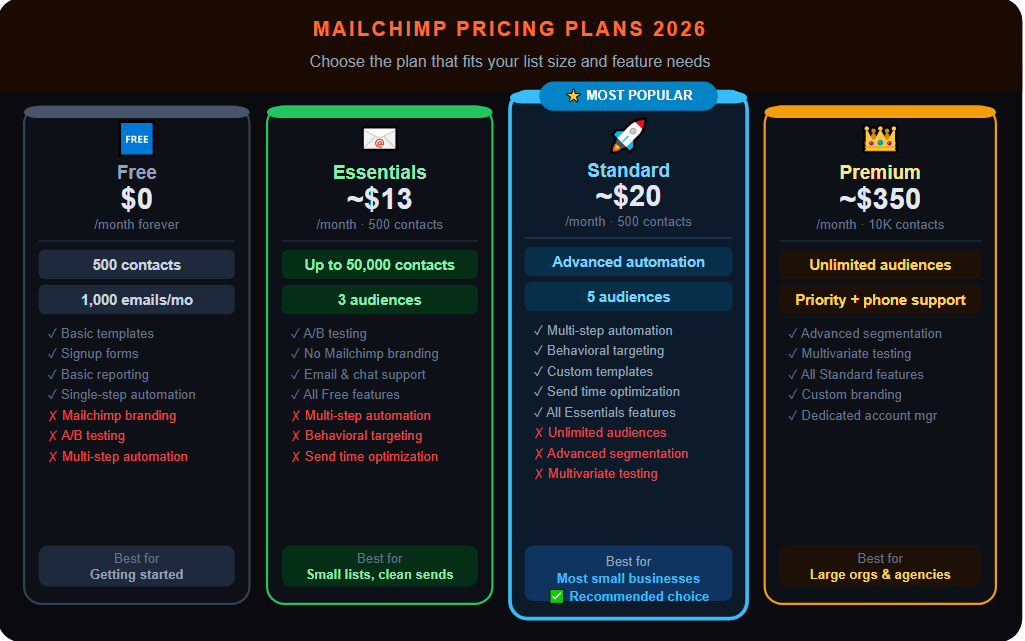
Free Plan
- Up to 500 contacts
- 1,000 emails/month
- Basic templates, signup forms, and reporting
- Limited automation (single-step)
- Mailchimp branding on emails
Essentials Plan (~$13/month for 500 contacts)
- Up to 50,000 contacts
- A/B testing
- Remove Mailchimp branding
- Email and chat support
- 3 audiences
Standard Plan (~$20/month for 500 contacts)
- Advanced automation (multi-step)
- Behavioral targeting
- Custom templates
- Send time optimization
- 5 audiences
Premium Plan (~$350/month for 10,000 contacts)
- Unlimited audiences
- Advanced segmentation
- Multivariate testing
- Priority support
- Phone support
Standard is the optimal choice for most small businesses.
Getting Started with Mailchimp: Step-by-Step Setup
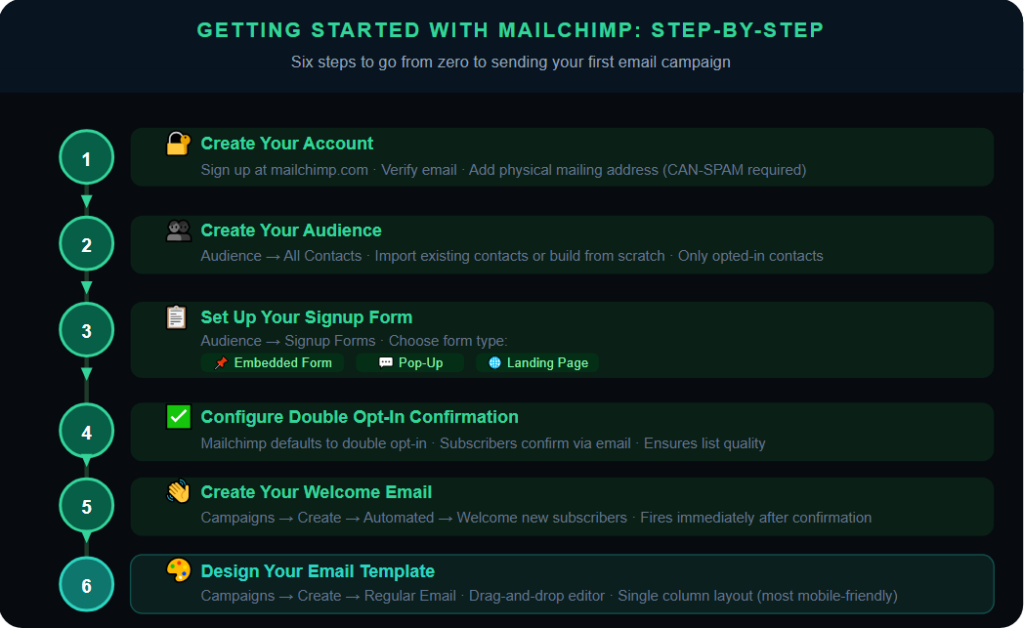
Step 1: Create Your Account
Create an account on mailchimp.com. You will have to validate both your email address and your physical mailing address (required by CAN-SPAM, you need to include a physical address with every single email that you send).
Step 2: Create Your Audience
On Mailchimp, your list is referred to as an “Audience”. Head to Audience -> All Contacts, and either import contacts or create a new list from scratch. When importing contacts, be sure not to include any contacts that have not opted into receiving your emails.
Step 3: Set Up Your Signup Form
Click on “Audience” then “Signup forms”. Mailchimp offers you a variety of sign-up form choices:
- Embedded form (for your website)
- Pop-up form
- Landing page
Design your form, thank you page, and confirmation email.
Step 4: Configure Your Signup Confirmation Email
Mailchimp has double opt-in as its default method, where an email gets sent for confirmation before the subscriber gets added. This ensures good list quality because only those who confirm get on your list as active subscribers.
Step 5: Create Your Welcome Email
To set up autoresponder emails in Mailchimp, head over to Campaigns > Create Campaign > Automated > Welcome new subscribers and ensure that it fires right away after subscription confirmation. Write a welcoming email.
Step 6: Design Your Email Template
Click on Campaigns > Create Campaign > Regular Email. Using MailChimp’s drag and drop interface, do the following:
- Select a layout design (Single Column design is the most mobile responsive)
- Insert a company logo and color scheme
- Insert text boxes, picture boxes, and CTA button
Mailchimp Automation: What You Can Build
MailChimp’s automation options are varied depending on your chosen plan. Let us find out what is available.
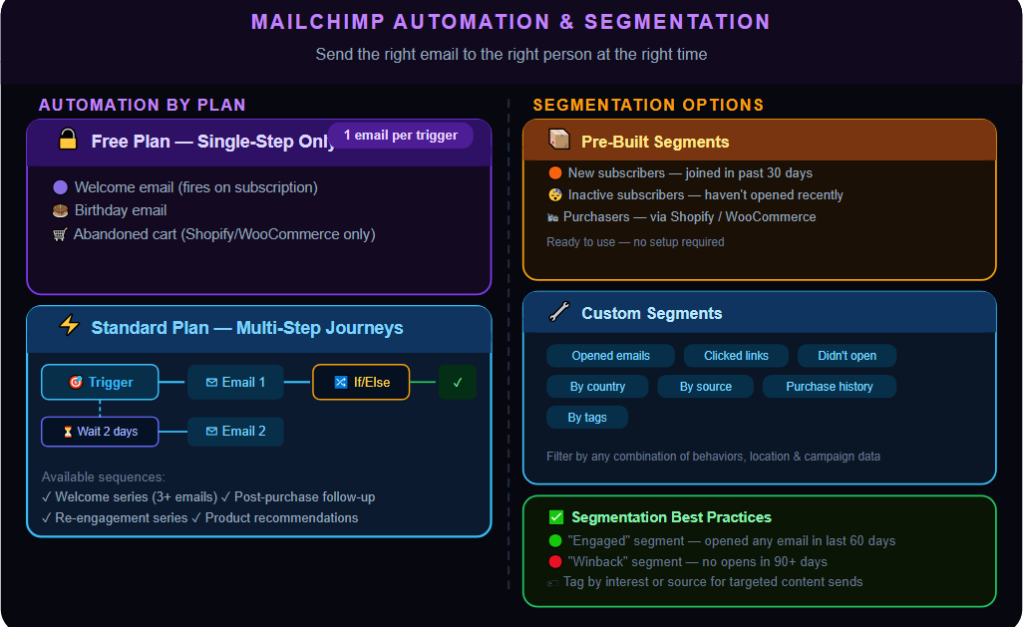
Free Plan (Single-Step Automations)
- Welcome email
- Birthday email
- Abandoned cart (requires Shopify or WooCommerce integration)
Standard Plan and Above (Multi-Step Automation)
- Welcome series (3+ emails)
- Post-purchase follow-up series
- Re-engagement series
- Customer onboarding process
- Product recommendations
Building a Multi-Step Automation in Mailchimp
- Navigate to Campaigns > All Campaigns > Create > Email > Automated
- Choose a trigger (for instance, “subscriber joins audience”)
- Create your workflow by utilizing the journey builder tool
- Include time intervals for emails (for example, “send 2 days after the last email”)
- If necessary, use conditions (for instance, send emails only to those who have clicked a certain link)
- Include emails in your workflow
- Test and start
Mailchimp Segmentation
By using segmentation, you can deliver targeted email messages to certain subsets of your audience. Mailchimp provides multiple segmentation types.
Pre-Built Segments
- New subscribers (those who subscribed within the past 30 days)
- Inactive subscribers (those who haven’t opened in the specified period)
- Subscribers who have made purchases (Shopify/WooCommerce integration)
Custom Segments
You can segment your audience based on such criteria as:
- Subscriber behavior (opened, clicked, did not open)
- Contact info (city, country, source)
- Campaign engagement (received certain campaigns)
- Tags (your custom labels)
- Purchasing behavior (integration with e-commerce platforms)
Best Segmentation Practices for Mailchimp
- Build an “Engaged” segment (opened any email in last 60 days) for key campaigns
- Build a “Winback” segment (no opens in last 90+ days) for win-back campaigns
- Tag subscribers by area of interest or origin for targeted sends of content
Mailchimp A/B Testing
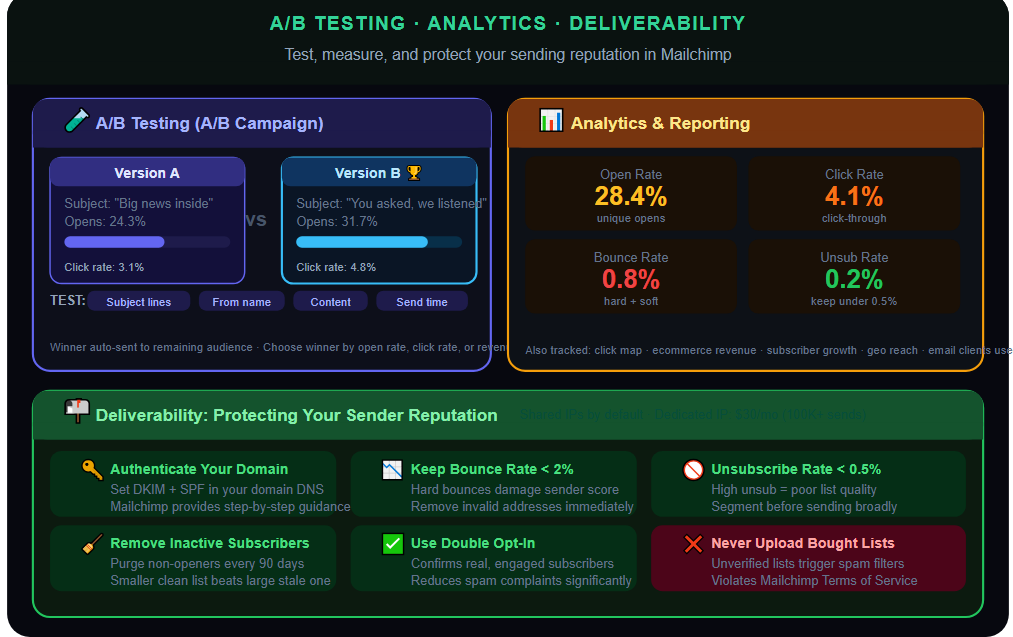
A/B testing is called “A/B Campaign” in Mailchimp. It allows testing 2 versions of an email to see which works better.
What You Can Test in Mailchimp
- Subject lines (most commonly tested)
- From name
- Content (different email designs or copy)
- Send time
How It Works
- Create the campaign normally.
- When creating the campaign, click on “A/B Test.”
- Select what you want to test and choose your winning criterion (open rate, click rate, or revenue).
- Then, set your test split (50/50 test or test on some people and then send the winner to rest).
- Afterwards, select how long to run the test.
- Finally, Mailchimp sends the winner to the remaining audience automatically.
Mailchimp Analytics and Reporting
Reporting of Mailchimp provides you with data at both the campaign level and the audience level.
Campaign Report Includes
- Open rate and number of unique opens
- Click-through rate and click map (links clicked on)
- Bounce rate (soft bounce/hard bounce)
- Unsubscribe rate
- Ecommerce stats (when integrated: revenue made/number of orders)
- Comparison to previous campaigns/industry benchmarking
Audience Dashboard Includes
- Subscriber growth trend over time
- Engagement trend over time
- Geographical reach
- Email clients used by users
Limitations
MailChimp does not provide multi-touch revenue attribution via its reporting, however, you can get email revenue attribution based on ecommerce integrations, but not the advanced cross-channel attribution. For further analytics, use Google Analytics via UTM parameters on links.
Mailchimp Deliverability: What You Need to Know
Mailchimp is a shared-sending service, which means that emails you send use the same IP addresses as emails sent by other Mailchimp customers. It works for many small-to-medium senders, although it may become a problem if those neighbors are spammy senders.
Deliverability Best Practices for Mailchimp Users
- Authenticate your domain (DKIM and SPF settings in your domain provider, Mailchimp will help with guidance)
- Keep your bounce rate under 2%
- Keep your unsubscribe rate under 0.5%
- Keep removing inactive subscribers
- Utilize double opt-in
- Do not upload unverified and bought lists
For volume-heavy senders (more than 100,000 emails/month), the Mailchimp dedicated IP feature ($30/month) allows you to create your own reputation as a sender.
Mailchimp Limitations to Be Aware Of
- Limited advanced segmentation options compared to Klaviyo/ActiveCampaign
- Inconsistent automation depending on account level
- Pricing model becomes very expensive based on contacts
- Handling multiple audiences (multiple brands/organizations) necessitates having multiple accounts
- Basic reporting tools; not for detailed attribution analysis
If Mailchimp becomes too limiting for your needs, the most common next platforms are Klaviyo for e-commerce companies or ActiveCampaign for SMB/B2B organizations.
Final Thoughts
Mailchimp is an amazing platform to begin with your email marketing campaign for a small business, content creators, or anyone who is just creating their first mailing list. This platform will serve you well due to its affordable free plan, user-friendly interface, and amazing integration system.
When your email marketing campaign becomes more complex, you may discover that the Standard plan provides everything you need for your complex program. Start with basic features and learn them gradually as you scale your email campaign. Mailchimp is a tool you can count on.