Make.com WhatsApp Business Automation Workflow AI: What It Actually Covers and Why It’s Easy to Get Wrong

Introduction
Make.com WhatsApp Business Automation is where you integrate the WhatsApp Business API with Make’s workflow builder to automate the entire process of sending messages and handling replies and conversations, instead of handling each and every WhatsApp conversation manually.
While it may not appear to be difficult, the amount of work involved in setting up the integration means that many businesses make mistakes in this field.
Why Make.com WhatsApp Automation Is More Complex Than It Appears
The WhatsApp Business Automation using Make is not a one-size-fits-all link but rather a combination of the below components:
- Accessing the WhatsApp Business API and getting it approved
- Using Make’s scenario builder to link the trigger to action
- Integration of the AI for response generation/classification
Many businesses tend to think that linking WhatsApp to Make happens in one go without considering the required configuration on their side based on increasing number of messages/usage cases.
A workflow for order confirmation looks and acts quite differently than the one used to answer customer service queries.
Major Areas of Make.com WhatsApp Business Automation
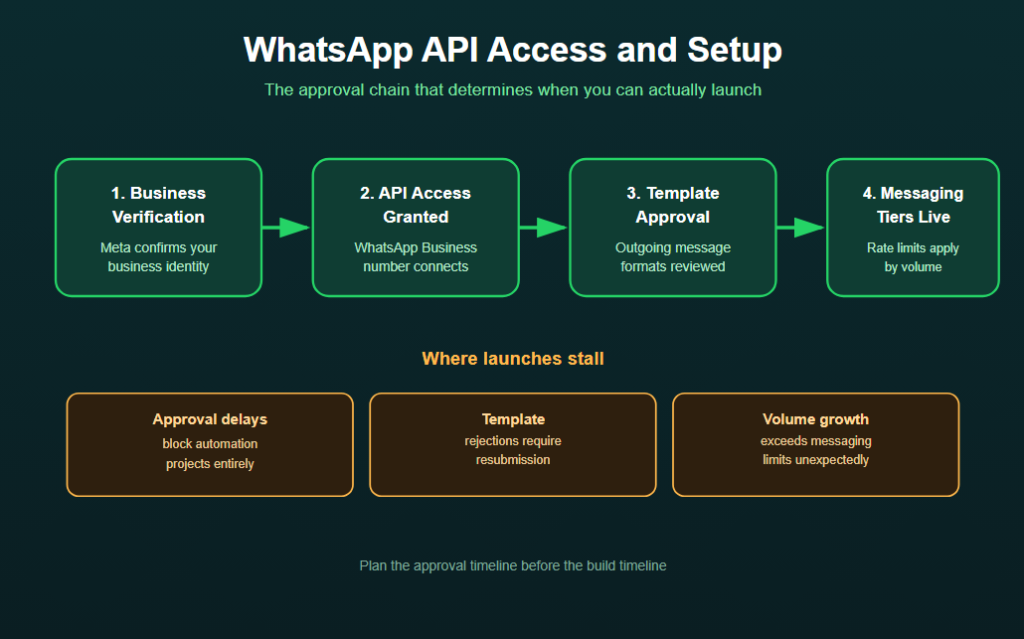
WhatsApp API Access and Setup
Rules Governing:
- Business verification requirements from Meta
- Template approvals for out-going notifications
- Rate limit and messaging tiers limitation
A delay in API set up is one of the most common and expensive problems because it can lead to:
- Blocking automation projects during the approval process
- Message templates rejections that have to be resubmitted
- Going beyond the messaging limits unexpectedly due to increased volumes
Scenario Building in Make
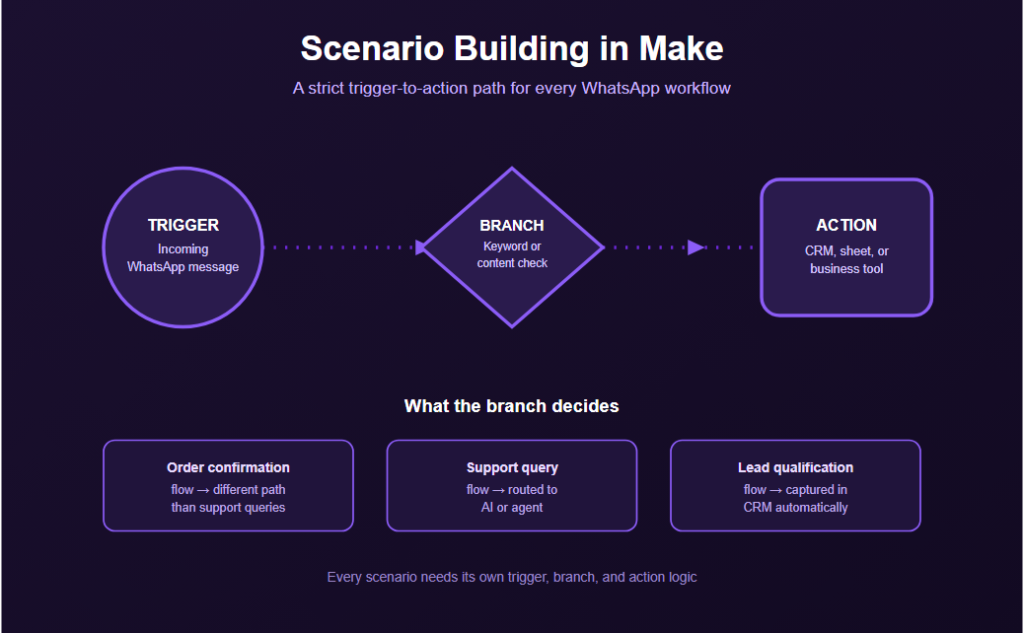
Automation from Make.com usually has visual scenario creators, which means users should follow a strict trigger to action approach for their WhatsApp workflows.
Scenario Building Often Includes
- Triggers triggered by incoming WhatsApp messages
- Branching conditions depending on the content or certain keywords in the message
- Actions that interact with CRM, spreadsheet or any other business tool
AI Integration for Conversational Responses
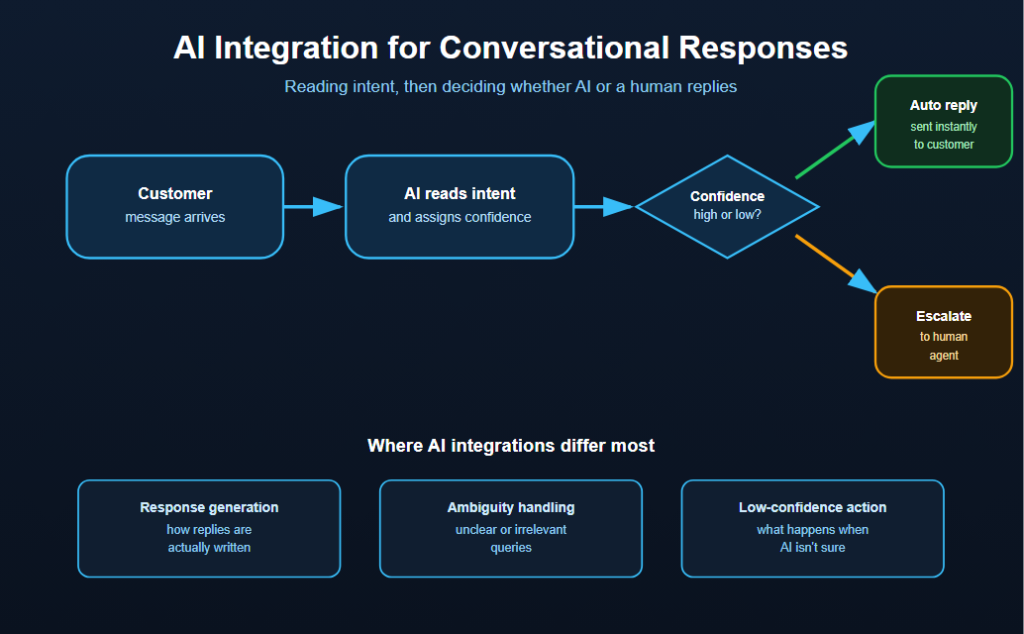
The handling process includes not just predefined auto-responses but also the growing trend of using AI in understanding the intention behind the customer’s message and providing relevant replies accordingly.
Those AI Integrations Usually Vary in Many Respects Including:
- How automatic responses are generated
- How effectively AI deals with ambiguous and irrelevant queries
- What actions are taken when the confidence of AI is low
Multi-Step Customer Journeys
Workflows in Make.com for WhatsApp may include the following:
- Order status update flows initiated from other systems
- Reminders and confirmations
- Leads qualifying processes via conversation
The level of complexity will vary depending on how many systems will be involved in the process.
Monitoring and Error Handling
However, there are some WhatsApp automations by Make.com that need to be continuously taken care of, such as:
- Failure in scenarios as a result of API rate limits or failures
- Status of message deliveries
- AI responses validation on a regular basis
This is due to the fact that any failure in the customer-facing WhatsApp process silently impacts the customer experience.
Why WhatsApp Automation Projects Break Down Even With Make’s Flexibility
The reason why the WhatsApp automation is not built reliably is that Make does not have the necessary components.
This may be the case because:
- Approval times of WhatsApp API are not considered in the project schedule.
- Test cases are not run with actual customer message variation before release.
- The AI-generated response is not being constantly monitored for inappropriate replies.
How Businesses Build Reliable Make.com WhatsApp Automation
Planning for API Approval Timelines
Big companies can initiate the WhatsApp Business API approval process in advance, particularly if there is a need to review message templates prior to going live.
Make.com Features Supporting Reliable Workflows
The following Make.com features allow companies to:
- Implement conditional logic to address different kinds of customer messages
- Implement error handling in case of scenario execution failure
- Integrate AI modules with a manual override option
Testing With Real Message Variety
Companies perform testing that involves:
- Realistic wording of customer messages over a wide range
- “Edge case” scenarios, where AI response would be incorrect
- Performance testing to verify its reliability at the expected volume of messages
Realistic testing of different types of messages allows companies to test the system properly before it is used by their customers.
Common Make.com WhatsApp Business Automation Mistakes
Underestimating API Approval Time
Beginning the timeline of the project without considering the delay in WhatsApp Business API and template approval process.
Skipping Real-World Testing
Testing the scenarios using basic and predictable messaging instead of testing all possible customer responses.
Fully Automating Without Human Fallback
Enabling the AI to engage with all customers’ queries without there being any process to escalate any complex queries.
Poor Monitoring of Live Performance
Inability to track:
- Failures when scenarios were not successfully executed
- The precision of the AI in responding to customer queries
- The number of customer complaints about automated responses
Bottom Line
Automation on WhatsApp Business through Make.com is very versatile and takes into account many different factors like API configuration, scenario construction, AI incorporation, multi-steps journey of customers, and continuous monitoring.
Since API problems and untried edge cases could easily hinder a launch, it would make much sense for companies to account for the time it may take to get approved and conduct thorough testing of messages.