Types of Dependencies in Project Management: A Complete Guide

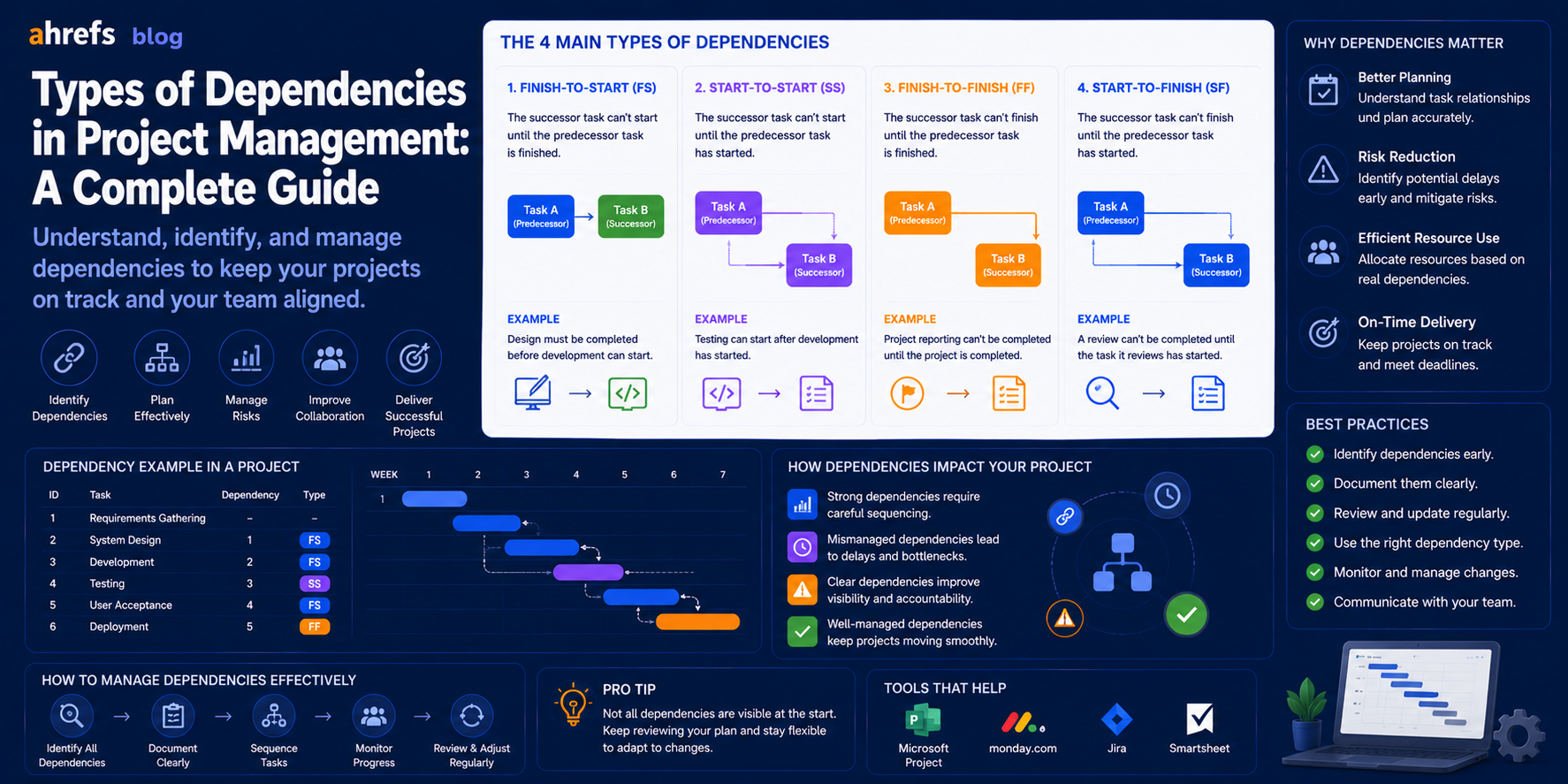
Every project has a task that cannot be accomplished unless another task is completed or initiated or partly completed first. This is a dependency, and comprehending this concept is key to creating an accurate schedule. Get your dependencies wrong and your Gantt chart will seem logical, but your project will fall apart from day one of execution. Below is a list of all types of dependencies.
Table of Contents
- What are Dependencies in a Project?
- The 4 Types of Logical Dependencies
- Dependency Relationships Based on Origin (Mandatory, Discretionary & External Dependencies)
- What is Lead Time and Lag Time?
- Dependency and the Critical Path
- How to Recognize and Document Dependencies
- Dependency Pitfalls
- Conclusion
What Are Task Dependencies?
Task Dependency is defined as a sequence relationship that exists between two tasks within a project schedule. It means that the dependency defines whether and how the beginning or completion of a task is linked to another task’s beginning or completion.
Dependencies are those that convert a flat task list into a project schedule; these are the sequencing dependencies that link tasks in a project.
The 4 Types of Logical Dependencies
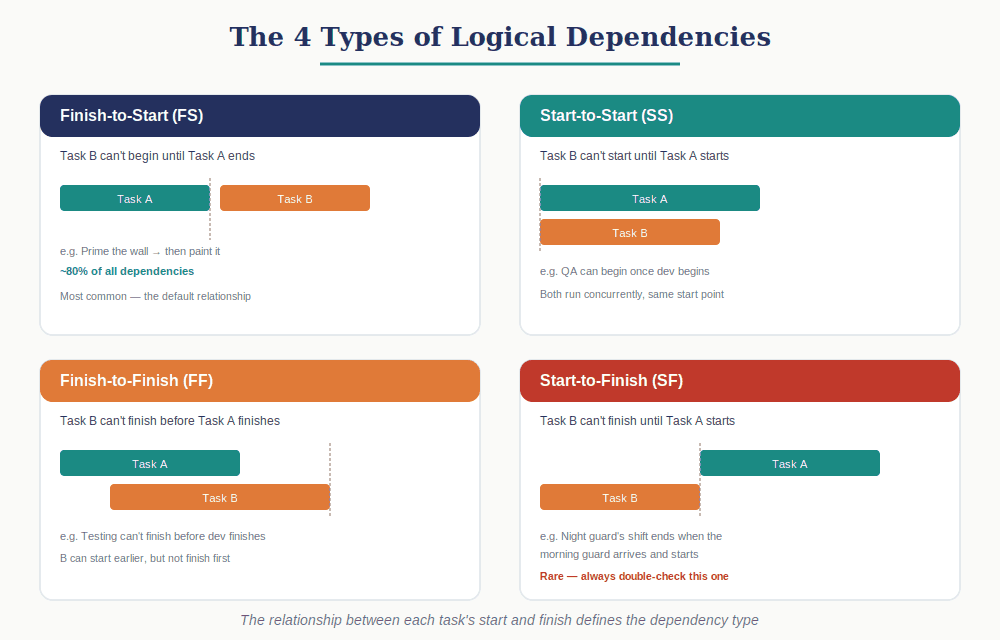
The four dependencies are based on the two possible occurrences during the course of a task, its initiation and its completion, in relation to one another in two related tasks.
1. Finish-to-Start (FS)
Definition: Task B cannot begin until Task A ends.
This is by far the most common form of dependency, about 80%+ of dependencies in any schedule.
Examples:
- One cannot start painting a room without priming.
- One cannot begin development without getting requirement approval.
Schedule impact:
Task B will start right after Task A is completed (or with lag/lead time applied).
2. Start-to-Start (SS)
Definition:Task B cannot be started without starting Task A.
Both tasks run concurrently, but B is dependent on A.
Examples:
- It is impossible to proceed with training manual preparation unless the software development process begins since the manual describes the product under development.
- The quality assurance process may begin when development starts, though development does not end yet.
Schedule impact:
The start of B is simultaneous with the start of A, or a lag from the start of A.
3. Finish-to-Finish (FF)
Definition: B cannot complete before A completes.
Both tasks can run simultaneously, but B completion depends on A completion.
Examples:
- Test cannot take place until development is done since test relies on something that is ready to be tested.
- Final proofreading cannot be done until content revisions are done.
Schedule impact:
The finishing date of B depends on the finishing date of A. While B can start before A, B must not be able to finish before A.
4. Start-to-Finish (SF)
Definition: Task B cannot finish until Task A starts.
It is the most unique dependency category and usually indicates that the schedule was developed in an unorthodox manner.
Classic example:
There is an overlapping task of a security guard shift where the night shift, Guard B, will only finish once the morning shift, Guard A, arrives and starts.
Schedule impact:
B finishes at the starting time of A. Seldom found in conventional projects, and always verify it if it is indeed the correct one.
Dependency Relationships by Source (Mandatory vs. Discretionary vs. External)
Other than the logic dependencies, there are dependency types that are based on the source of the dependency that creates the dependency.
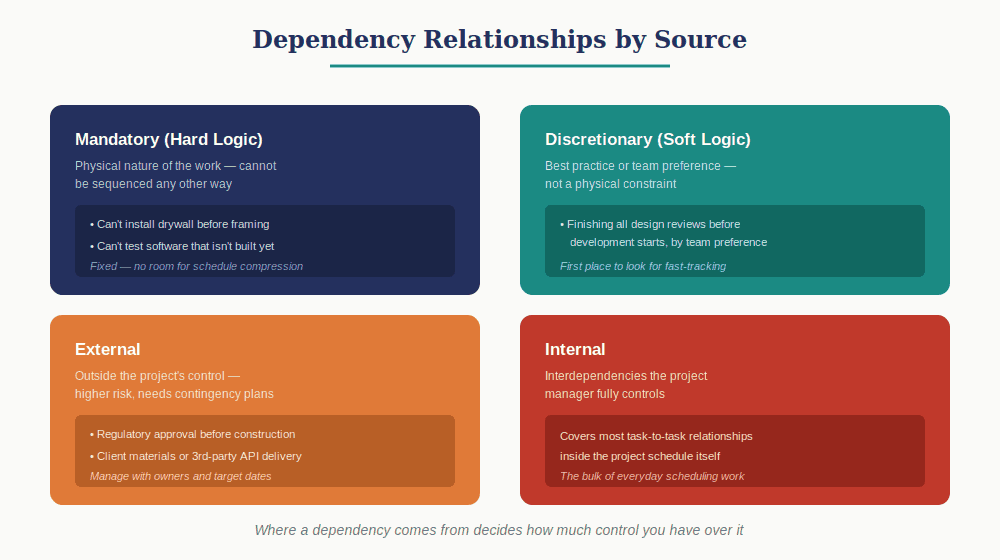
Mandatory Dependencies (Hard Logic)
Inherent dependencies, These are based on the nature of the work being done. They arise because of the physical nature of the work done.
Examples:
- You cannot install the drywall before finishing the framing.
- You cannot test the software that hasn’t been created yet.
These cannot be manipulated by the scheduling.
Discretionary Dependencies (Soft Logic / Preferred Logic)
Dependencies defined on the basis of best practice, personal preference within the team, or risk management and not physical dependency. These dependencies can actually be sequenced in some other way as well.
Example:
The team likes to complete all the design review phases before starting the development phase even though the development process does not really need to start. This is simply a matter of preference and not a physical constraint.
As they can be modified, these are the first places where we should look for schedule compression (through fast-tracking).
External Dependencies
Dependencies that are based on things beyond the project’s control.
Examples:
- Regulatory approval that is required before any construction can begin.
- Delivery of materials from clients before designing commences.
- Third party API activation before completing development of the integration.
External dependencies pose higher risks since they cannot be controlled, only managed and planned for contingencies.
Internal Dependencies
Interdependencies among tasks in the project that the project manager controls.
This covers most interdependencies that occur in projects.
Lead and Lag Time Explained
Interdependencies may also be modified by lead/lag time, adjustments of time made to the interdependency between the two tasks.
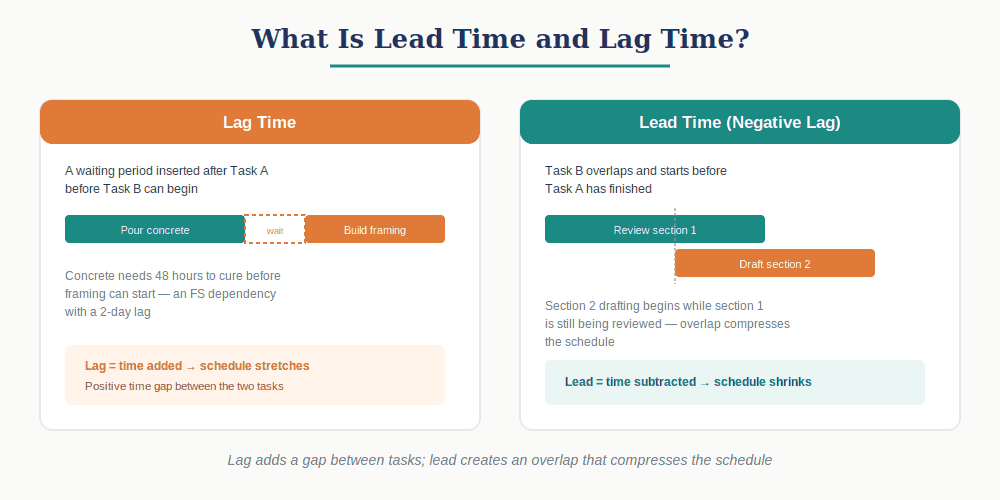
Lag Time
There was a waiting period introduced following the occurrence of the triggering event for the predecessor task. Delays the beginning (or end) of the successor task by a fixed period of time.
Example:
Once the concrete is poured (completion of Task A), there will be a need for curing it for 48 hours before the construction of the framework can begin (beginning of Task B). This is the case of an FS dependency with a lag of 2 days.
Lead Time (Negative Lag)
Overlap of tasks which permits the start of the successor task even before the completion of the predecessor task. This approach reduces the duration of the project schedule by overlapping some portions of two tasks.
Example:
A writer can start drafting section 2 of a document while at the same time the section 1 is being reviewed. The lead time is the scheduling compression tool. Its application to the FS dependencies makes them Start-to-Start.
Dependencies and the Critical Path
Critical Path depends solely on the dependencies map. Add a new dependency or delete one from the map, and you may affect the tasks placed in the Critical Path along with changing the shortest time needed for completing the project.
Key points:
- Tasks with no float lie on the Critical Path, and they depend on other activities that cannot be delayed.
- Tasks with small float must be carefully controlled, since only one delay can make them enter the Critical Path.
- Dependencies that are optional (discretionary) and may be deleted or transformed into lead-time dependencies represent schedule compression areas.
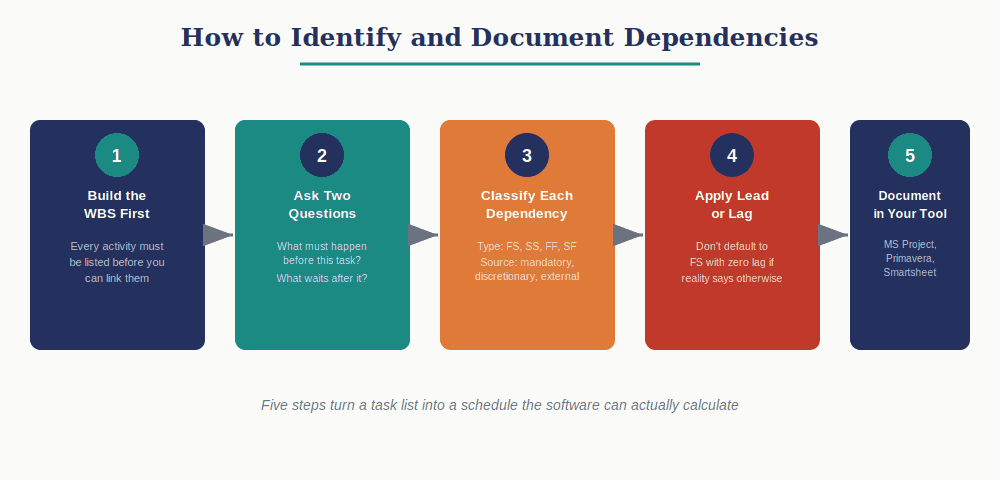
How to Identify and Document Dependencies
Step 1: Build the WBS first
It is impossible to define dependencies without first identifying the entire set of activities. Work Breakdown Structure must exist prior to dependency definition.
Step 2: For each task, ask two questions
- What must be completed (or begun) before this activity can commence?
- What other activities are waiting to be completed (or begun) after this activity?
Step 3: Classify each dependency
Determine the type (FS, SS, FF, SF) and the source (mandatory, discretionary, external, internal) of the relationship.
Step 4: Apply lead or lag where appropriate
Do not automatically classify the relationship as FS and lag = 0 where actual conditions require waiting or overlapping time.
Step 5: Document in your scheduling tool
Microsoft Project, Primavera P6, Smartsheet, and other PM software have built-in predecessor/successor fields. This enables the software to compute for the critical path, float, and impact on the project schedule of any modifications that may be made.
Common Dependency Mistakes
Defaulting every dependency to Finish-to-Start
Real-life situations involve SS, FF, and lead relationships that will shorten the schedule. Using only the FS relationship will result in a much longer schedule.
Forgetting external dependencies
Any external dependency outside the schedule for an approval or client deliverable becomes a hidden risk. Add such a task in the schedule with a designated owner and target date, even though you may not be in control of the output.
Not distinguishing mandatory from discretionary
In case of schedule compression, there should only be relationships to fast track that are discretionary in nature. Unless you know which relationships fall under each category, then you can’t make this decision.
Building dependencies in the tool without validating them with the team
It is possible for project managers to draw upon dependencies through assumption alone and not the input from the team members. The subject matter experts usually have information that is not captured in the scope documents.
Final Thoughts
Dependencies are the structure of the schedule. The task list lets you know what you need to do; the dependency relationships let you know in what sequence and at what speed you should do those things. Doing them well, getting the types right, understanding the difference between the two types of dependencies, and doing the proper lead/lag, is what differentiates a realistic schedule from an artificially constructed one that does not survive the first test in practice. Spend time working out your dependencies and you will have a schedule worth defending.